What is Dynamic Margin and Leverage?

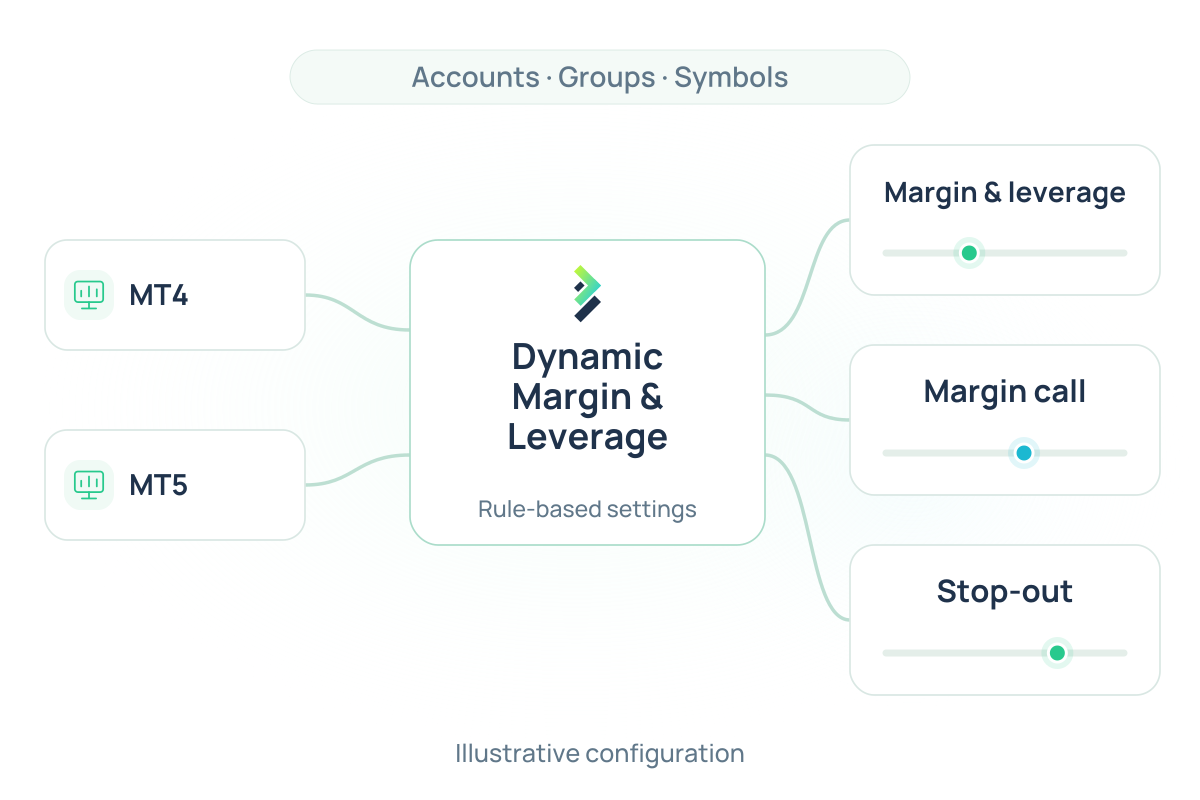
Brokeree's Dynamic Margin and Leverage is a plugin for MetaTrader 4 and 5 brokers that extends the platform's built-in margin and leverage controls. MetaTrader manages these settings at the group level, which means every account in a group follows the same rules across every symbol. For brokers with diverse client profiles and multi-asset offerings, this can limit how precisely they manage risk.

Dynamic Margin and Leverage changes that by letting brokers set custom margin requirements and leverage levels for individual accounts and symbols. It also gives brokers extended control over margin call and stop-out behavior, going beyond the platform's default group-level settings. Brokers can customize the conditions that trigger margin calls, define stop-out levels for specific accounts, and reject orders that would breach set thresholds before they are executed. The result is a more flexible and precise risk management setup, built directly into the MetaTrader environment brokers already use.

Key Advantages

Per-Symbol Margin and Leverage Control

MetaTrader sets leverage at the group level, so every account in a group gets the same leverage on every symbol. That works until a broker needs to treat one instrument differently from another.

Dynamic Margin and Leverage allows brokers to set leverage levels per symbol. Brokers can configure and set leverage levels for different instruments within the same account group without affecting other instruments.

Account-Level Margin Adjustments

MetaTrader applies margin settings to an entire group. To give one client different conditions, brokers either move them to a new group or change the rules for everyone.

Dynamic Margin and Leverage lets brokers apply custom margin conditions to individual accounts, making it easier to support VIP clients, high-risk profiles, or special agreements without restructuring existing group setups. Rules can target specific accounts by balance range, equity level, deposit currency, or open lot volume. Margin requirements can also be time-based, for example, automatically increasing during weekends or ahead of major market events, and reverting once the period ends. Brokers can set an unlimited number of rules, and changes take effect without restarting the server.

Order Rejection on Margin Breach

The plugin can reject orders during pre-trade validation if the order would violate configured margin levels. This helps brokers enforce risk rules automatically before execution.

The rejection is logged in the trader’s journal. Reject rules accept the same filtering options as margin rules, so brokers can limit rejections to specific symbols, time periods, lot ranges, or account conditions, creating an additional layer of protection between a margin call and a stop-out event.

Custom Stop-Out Conditions

Beyond MetaTrader’s standard group-level stop-out settings, the plugin supports additional account- and rule-based liquidation logic, giving risk teams finer control over how margin deterioration is handled.

Stop-out rules can be set in absolute percentage terms or relative to the group’s existing margin call and stop-out values. The solution supports symbol-specific targeting, allowing brokers to liquidate positions only for a particular instrument at a defined margin level, while leaving the rest of the trader’s portfolio unaffected. 

Dynamic Leverage by Balance or Equity

Profile rules allow brokers to automate account leverage changes based on a trader’s balance or equity level. Unlike margin-based adjustments, these changes update the account profile directly, so traders can see their current leverage in their MetaTrader terminal.

A broker can configure a leverage ladder so that a trader starts with higher leverage and moves to lower leverage as their balance grows. The direction of the change can also be controlled: the plugin can be set to only lower leverage as balances increase, without automatically restoring higher leverage if the balance drops back down. The plugin monitors balance and equity events, including deposits, withdrawals, and closed positions, and applies leverage changes automatically when the defined thresholds are met.

Plugin Configurator Integration

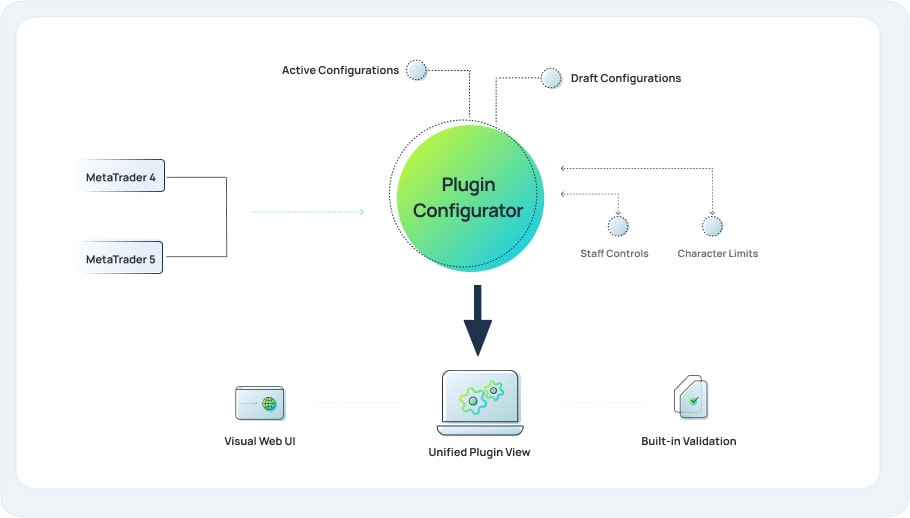
All Dynamic Margin and Leverage settings can be managed through Brokeree’s Plugin Configurator, a web-based UI purpose-built for managing MetaTrader plugins. Brokers connect it to their MT4 and MT5 servers and manage every parameter from a single web-based interface. 

They can adjust margin rules, leverage levels, order rejection thresholds, and stop-out conditions in a few clicks, across multiple servers within the same interface. Every change is logged, so there is always a record of what was updated and when.

Request free demo

This field is for validation purposes and should be left unchanged.
Trading platform

MetaTrader Default vs Dynamic Margin and Leverage

Feature MetaTrader Default Dynamic Margin and Leverage
Margin settings Group and symbol level Per account, per symbol, per lot level
Effective leverage Per group and account profile Per instrument, account, dynamic by balance or equity
Order rejection Not available natively Pre-trade validation against custom margin thresholds
Stop-out Group-level default Per account, per symbol, per defined condition
Leverage visibility Static Traders see live leverage changes in their terminal
Configuration MT Administrator interface Plugin-level configuration, with optional web UI via Plugin Configurator

About Plugin Configurator

Plugin Configurator is Brokeree’s management interface for MetaTrader plugins. It connects to MT4 and MT5 servers and provides brokers with a graphical interface for managing plugin settings, without requiring edits to raw server configurations. Dynamic Margin and Leverage is fully supported through Plugin Configurator.

Learn more about Plugin Configurator
About Plugin Configurator

FAQs

What is MT4/MT5 Dynamic Margin and Leverage?

It is a server-side plugin for MetaTrader 4 and 5 that expands the platform’s native margin management capabilities. It lets brokers configure symbol-specific margin requirements, apply custom conditions to individual accounts, reject orders at the pre-trade validation stage, and apply additional liquidation logic beyond MetaTrader’s standard group-level settings.

How is it different from MetaTrader's built-in margin and leverage settings?

MetaTrader’s standard setup relies on group- and symbol-level configuration, which can make account-specific policies harder to maintain. Dynamic Margin and Leverage adds account- and symbol-level rules, time-based margin adjustments, pre-trade order rejection, and custom liquidation conditions that go beyond what the platform supports natively.

Does the plugin work on both MT4 and MT5?

Yes. Dynamic Margin and Leverage is compatible with both MetaTrader 4 and MetaTrader 5. Brokers running either platform, or both simultaneously, can manage all settings from a single interface through Plugin Configurator.

Do I need to edit server configuration files to manage the settings?

No. All settings can be managed through Plugin Configurator’s web-based interface. Changes can be saved as drafts and published when ready, or applied directly to the live plugin. No editing on the MetaTrader platform level is required.

Will the plugin affect existing positions when rules are updated?

This depends on the synchronization setting. When synchronization is enabled, updating the plugin’s configuration triggers a margin recalculation for all accounts and positions covered by the new rules. When it is disabled, existing positions are not affected until the next relevant event occurs. Brokers can choose which behavior fits their operation.

Learn more about MT4/MT5 Dynamic Margin and Leverage