
Brokeree Solutions has introduced a major interface upgrade for two of its flagship investment solutions, Social Trading and PAMM. Both products now feature a new look, redesigned dashboards, and improved navigation, with a unified design system bringing greater consistency across their interfaces.
Developed with client feedback in mind, the update focuses on how the information is displayed and how brokers and their clients interact with the solutions every day.
Let’s take a closer look at what’s new. But first.
Why Did We Rebuild the Interface?
Managed account services are among the strongest growth drivers a broker can offer today. According to a 2024 study, brokers that actively promoted copy trading and connected it to their other services generated 10% to 20% of their total trading volume from it. Requests for our copy trading technology — Social Trading — grew 16% over the same year.
Much of this growth comes from clients who want to invest without trading on their own, an audience World Finance describes as the key target market for managed account services. These investors choose a signal provider or money manager based on what they see on screen, from the track record to the fees. A clear, professional interface gives them the confidence to commit capital.
Brokers, meanwhile, need to manage these services efficiently as their client base grows, from tracking trading activity to handling routine administrative tasks. Many brokers offer Social Trading and PAMM side by side, and their teams switch between the two throughout the day. A unified design system gives both products the same look and feel, so moving from one to the other feels familiar from the first click.
Those were some of the considerations behind our latest redesign. The guiding idea was simple: put the most important numbers in front of users and keep everything else one click away.
What this means for brokers
One Design System, Two Upgraded Products
The redesign of Social Trading and PAMM broadly focuses on two areas: reorganizing information and settings to make them easier to find, and updating the interface elements across both products.
Both products now share the same approach to colors, typography, buttons, cards, tables, and other interface elements. Each still has its own interface, designed around its users and tasks. Brokers can customize interface colors to match their corporate identity, and light and dark themes are available out of the box.
Navigation follows the same logic. Social Trading and PAMM each have their own main tabs for everyday work, built around their users. Settings are grouped similarly and admins can also switch between the money management services and Ratings Module with a single click. In other words, admins who know one product will find settings familiar in the other.
What’s New in Social Trading
Brokeree Social Trading is one of the most popular copy trading platforms in the industry and according to our research, it powers the copy trading services of around 40% of brokers. The platform that so many brokers rely on every day now gets its biggest upgrade yet, and the changes start on the very first screen.
1. Reorganized Information and Navigation
The changes begin on the new Home page, which provides an overview of important system activity and quick links to frequently used actions. Administrators can access client records, subscriptions, and provider lists through dedicated pages.
The Product tab brings together application settings, including client and provider configurations, notifications, account groups, and staff management. The System tab covers infrastructure-related information, such as trading servers, copy modules, server communication, and licensing details.
The Reports tab is now a single dashboard that summarizes every report on one page. Each card leads to the full table, so users open the details only when they need them.
2. A fresh, modern look
Data across Social Trading now come to life in easy-to-read cards and charts. Statuses, counts and trends stand out at a glance, so admins can see what needs attention without scanning long tables. The new interface looks as modern and professional as the services brokers build on it.
Want to experience the new Social Trading interface?
What’s New in PAMM
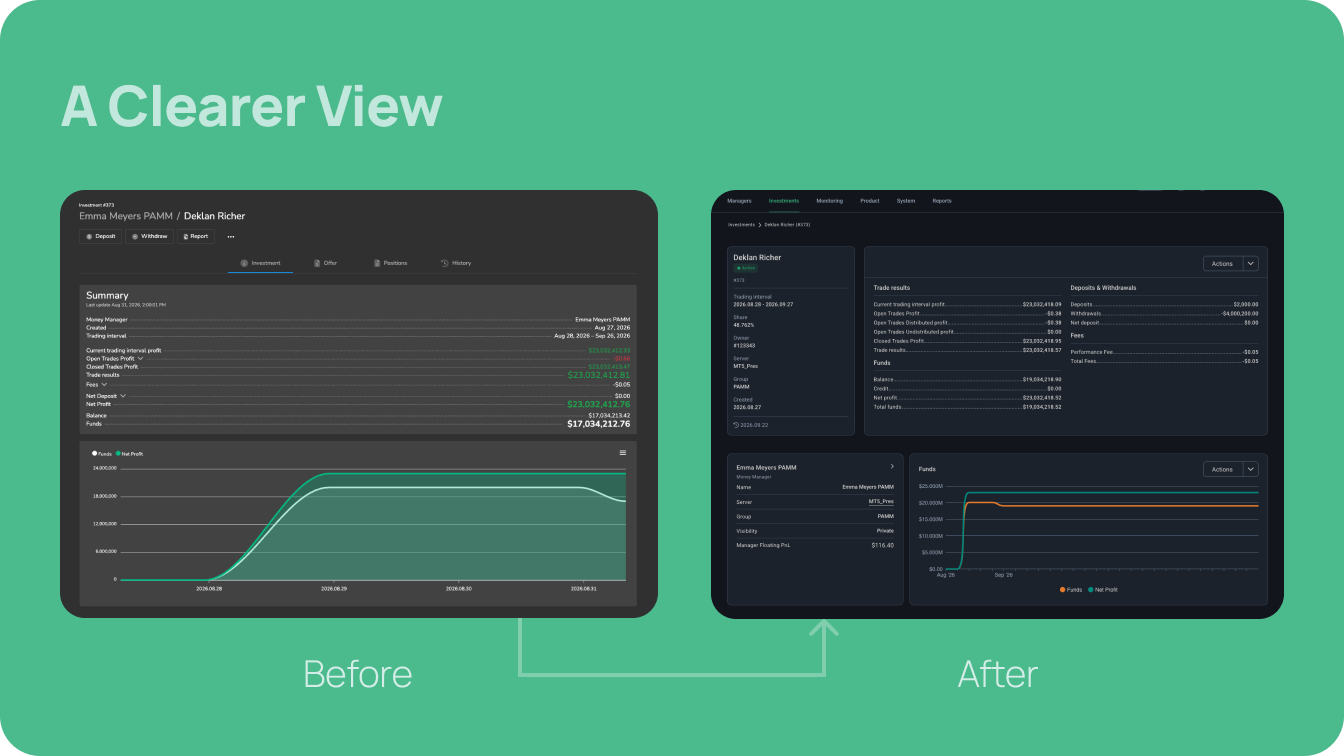
PAMM is the latest product to move to the new design system. The familiar Managers, Investments and Monitoring tabs keep their logic, but the experience around them has been significantly upgraded.
Want to experience the new PAMM interface?
More to Come
The new interface is the latest in a series of updates to our flagship investment products. Earlier this year, we released Integration APIs for both Social Trading and PAMM, so brokers, financial institutions and crypto companies can offer copy trading and managed accounts beyond MetaTrader and cTrader. Social Trading also gained its first Add-on, Feed, an in-platform channel where providers share updates with their followers, along with content moderation tools for brokers.
We continue to invest in Social Trading and PAMM, and our clients’ feedback will keep shaping what we build next. More updates are already in development, and we look forward to sharing them soon.
Final Remarks
With Social Trading and PAMM now sharing one modern interface, brokers get a fully branded investment offering and a faster way to reach the information that matters. For existing clients, the redesign makes daily work smoother. For brokers exploring copy trading or PAMM, it’s a strong foundation for building a successful investment service.
Curious how the new interface would look with your brand?
Book a demo to explore Social Trading and PAMM firsthand.