CRM CONNECTIVITY FOR BROKERS

CRM Integrations for Forex Brokers

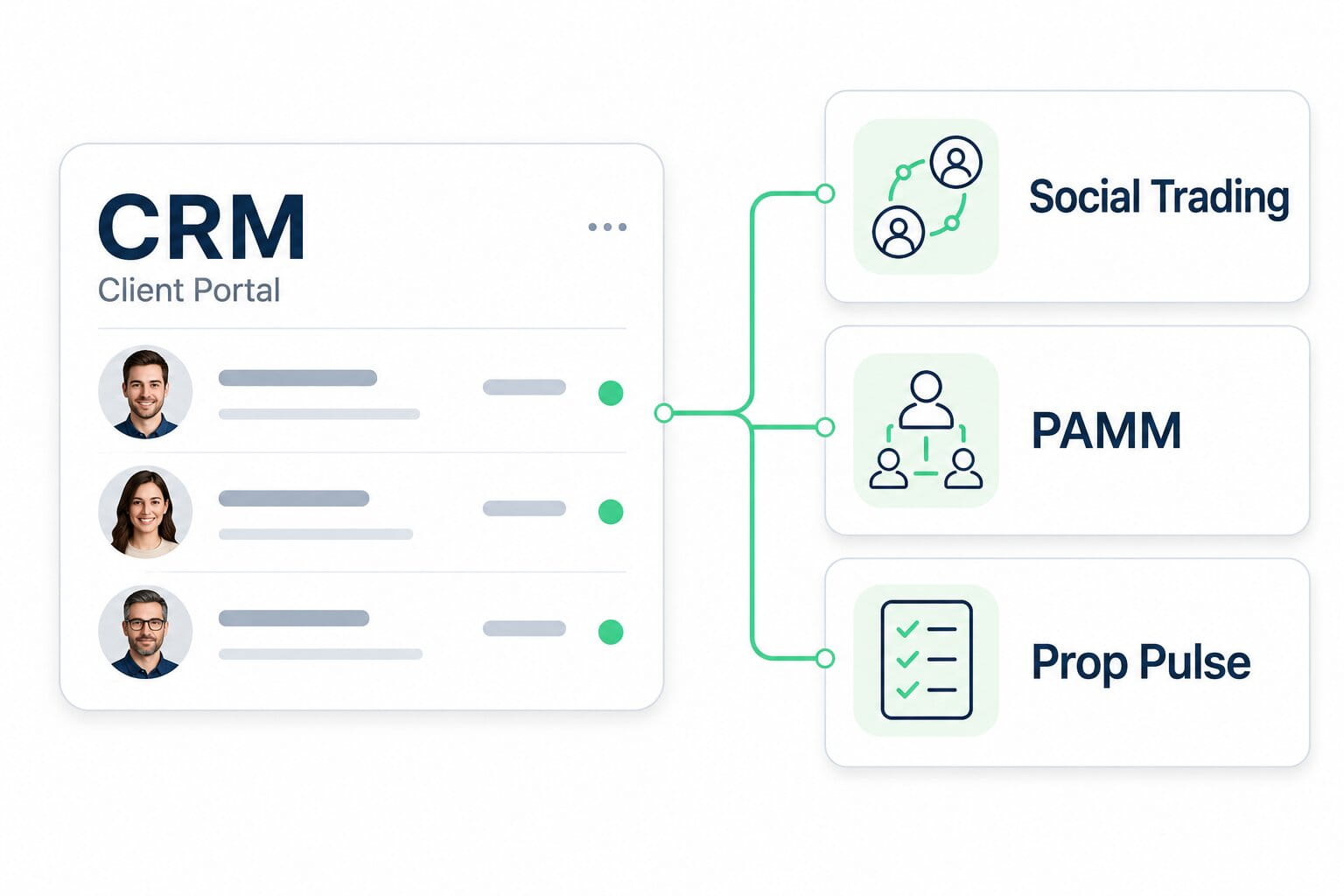
Connect your CRM with Brokeree Social Trading, PAMM or Prop Pulse. Explore available integrations for your brokerage or prop trading business and find a setup that fits your trading platform, client services and operational requirements.
CRM Integrations for  Forex Brokers
BROKEREE SOLUTIONS

Connect Your CRM with Brokeree Solutions

A CRM integration connects your client management environment with the technology behind your trading services. For brokers, this means planning how client-facing processes in the CRM work alongside copy trading, managed investment or trader evaluation services.

Brokeree provides the specialist product functionality, while your CRM supports client relationships and the processes available within its own system. The integration connects the two within a defined scope. Supported actions, data exchange and client access options depend on the selected CRM, Brokeree product and implementation.

CHOOSE YOUR SERVICE

Explore CRM Integrations by Product

Start with the service you want to offer. Browse the corresponding CRM integrations and review the available connections for your business.

COPY TRADING

Social Trading

Build a copy trading service around signal providers and followers with Brokeree Social Trading. Explore CRM integrations for this product and identify a connection that fits the way your brokerage wants to onboard clients and provide access to the service.

MANAGED INVESTMENTS

PAMM

Develop a managed investment offering with Brokeree PAMM, connecting money managers and investors under broker-defined conditions. Explore CRM integrations for this product and identify a connection that fits your investment service and the way clients interact with your brokerage.

TRADER EVALUATION

Prop Pulse

Structure your prop trading offering with Brokeree Prop Pulse, covering challenges, evaluation objectives and trader progression. Explore CRM integrations for this product and identify a connection that fits your client management processes and the operational needs of your prop business.

CRM integrations Social Trading

Syntellicore CRM and Social Trading

Syntellicore CRM and Social Trading

Syntellicore is a flexible CRM system developed for forex brokers and white labels dedicated to a higher customer experience. Syntellicore is developed by Dynamic Works, the regionsโ€™ key vendor, with numerous important projects in the public, banking, and private sectors.

Learn more
Skale CRM and Social Trading

Skale CRM and Social Trading

Skale is a CRM software provider which offers essential tools for efficient back-office management, such as a manageable customer database, a client portal for convenient communication, and marketing systems to attract new customers through IB Office and Affiliate Profiles.

Learn more
XCritical CRM and Social Trading

XCritical CRM and Social Trading

XCritical is a software development company that provides comprehensive solutions to forex companies. The company's software is engineered to streamline processes and enhance efficiency, ultimately allowing forex brokers to offer better services to their clients.

Learn more
FX Back Office CRM and Social Trading

FX Back Office CRM and Social Trading

FX Back Office is a CRM provider born from the vision of a group of highly experienced individuals in FX brokerage businesses. Most of FX Back Office's sales staff, managers, and directors have been involved in the Forex industry since 2007, demonstrating their deep knowledge and understanding of the industry's nuances.

Learn more
Cloud Forex CRM and Social Trading

Cloud Forex CRM and Social Trading

Cloud Forex CRM, a product developed by PHEASANTECH in 2016, offers forex brokers and traders a highly dependable solution for securely managing confidential information in an organized manner. This product was specifically designed to cater to the needs of both startup and established brokerage firms, providing them with a comprehensive solution to streamline their operations.

Learn more
Nullpoint and Social Trading

Nullpoint and Social Trading

Nullpoint Technologies, founded in 2017 with offices in Cyprus and Barcelona, delivers advanced SaaS solutions for Forex brokerages, including Forex CRM, IB Management, as well as MT4/MT5 Hosting and Administration.

Learn more

CRM integrations PAMM

Syntellicore CRM and PAMM

Syntellicore CRM and PAMM

Syntellicore is a flexible CRM system developed for forex brokers and white labels dedicated to a higher customer experience. Syntellicore is developed by Dynamic Works, the regionsโ€™ key vendor, with numerous important projects in the public, banking, and private sectors.

Learn more
Skale CRM and PAMM

Skale CRM and PAMM

Skale is a CRM software provider which offers essential tools for efficient back-office management, such as a manageable customer database, a client portal for convenient communication, and marketing systems to attract new customers through IB Office and Affiliate Profiles.

Learn more
XCritical CRM and PAMM

XCritical CRM and PAMM

XCritical is a software development company that provides comprehensive solutions to forex companies. The company's software is engineered to streamline processes and enhance efficiency, ultimately allowing forex brokers to offer better services to their clients.

Learn more
FX Back Office CRM and PAMM

FX Back Office CRM and PAMM

FX Back Office is a CRM provider born from the vision of a group of highly experienced individuals in FX brokerage businesses. Most of FX Back Office's sales staff, managers, and directors have been involved in the Forex industry since 2007, demonstrating their deep knowledge and understanding of the industry's nuances.

Learn more
Nullpoint and PAMM

Nullpoint and PAMM

Nullpoint Technologies, founded in 2017 with offices in Cyprus and Barcelona, delivers advanced SaaS solutions for Forex brokerages, including Forex CRM, IB Management, as well as MT4/MT5 Hosting and Administration.

Learn more

CRM integrations Prop Pulse

FX Back Office CRM and Prop Pulse

FX Back Office CRM and Prop Pulse

FX Back Office is a CRM provider born from the vision of a group of highly experienced individuals in FX brokerage businesses. Most of FX Back Office's sales staff, managers, and directors have been involved in the Forex industry since 2007, demonstrating their deep knowledge and understanding of the industry's nuances.

Learn more
Intivionโ€™s AltimaCRM and Prop Pulse

Intivionโ€™s AltimaCRM and Prop Pulse

Entering the fintech space in 2006, Intivion Technologies provides bespoke Forex CRM solutions to the brokerage industry. Its flagship CRM solution, AltimaCRM is a powerful customer relationship management suite tailored to the specific needs of FX brokers

Learn more
Syntellicore CRM and Prop Pulse

Syntellicore CRM and Prop Pulse

Syntellicore is a flexible CRM system developed for forex brokers and white labels dedicated to a higher customer experience. Syntellicore is developed by Dynamic Works, the regionsโ€™ key vendor, with numerous important projects in the public, banking, and private sectors. Dynamic Works was also one of the first companies to introduce a forex CRM in 2011.

Learn more
FROM REQUIREMENTS TO LAUNCH

Plan Your CRM Integration

A successful integration starts with a clear scope. Use these steps to align your CRM, Brokeree product and trading infrastructure before moving into implementation.

Step 01

Define Your Setup

Identify your CRM, trading platform and the Brokeree product you want to use. Outline the service you plan to offer and the client and administrator actions that need to work across the connected systems.

Step 02

Confirm the Integration Scope

Review the available connection with the relevant teams. Confirm supported functions, data exchange, access permissions and any additional development or configuration needed for your requirements.

Step 03

Configure and Test

Coordinate setup and test the agreed workflows before launch. Check account mapping, permissions, data handling and error scenarios, focusing on the actions included in your integration scope.

Step 04

Prepare for Launch

Agree on launch readiness, support contacts and responsibility for each part of the integration. Establish how your teams will handle operational issues and changes to the connected systems.

CRM Integration FAQs

A CRM integration connects a broker’s client management system with another part of its technology infrastructure. In this context, it links the CRM with a Brokeree product so that agreed client or operational processes can work across the two systems. The exact functions depend on the integration.

The directory above lists CRM integrations by product: Social Trading, PAMM and Prop Pulse. Choose the relevant product to see its listed CRM providers, then open an integration page for details. Confirm your intended configuration with our team before planning implementation.

No. Integration availability differs by product, and a listing for one product does not establish support for the others. Check each product group separately, especially if you plan to offer more than one service through the same CRM.

An existing CRM may be suitable if it has a compatible integration for the Brokeree product and workflows you need. Share your CRM name, trading platform and requirements with our team to discuss the available options before considering a change of provider.

Compatibility needs to be checked for the complete combination of CRM, Brokeree product and trading platform. A product’s support for a platform does not automatically mean that every CRM integration supports the same configuration. Confirm your platform and deployment requirements when discussing the integration.

No. The integrations on this page connect third-party CRM systems with Brokeree products. Your CRM and the selected Brokeree solution have different roles. Which functions appear in the client portal, and how clients access them, depend on the implementation.

Contact our team with the CRM name, the Brokeree product you are considering and the workflows you need. An unlisted CRM should not be assumed compatible; the available options and any technical requirements need to be assessed before a connection can be confirmed.

Costs and timelines depend on the selected systems, the availability of an existing integration and the scope of configuration, testing or additional development. Define the required workflows first, then request an estimate that accounts for the responsibilities of each technology provider involved.

Find the Right CRM Integration for Your Business

Tell us which CRM and trading platform you use, which Brokeree product you are considering and what you want the connection to support. Our team can discuss the available options and the requirements for your planned setup.